The {{ html.searchrange }} function creates a dual-handle range slider (from–to) that allows users to filter numeric table data within a selected range.
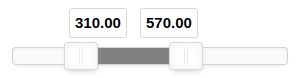
Usage
{{ html.searchrange(field,min,max,step,color,handlers,CSS_Class) }}Parameters:
- Field (Required)
Specifies which table field to search within.- Example:
{{ html.searchrange('price',0,100,1) }}
- Example:
- Min (Required)
Defines the minimum value of the slider range. - Max (Required)
Defines the maximum value of the slider range.selection. - Step (Required)
Defines the increment step between values (e.g., 1, 0.5, 10). - Color
Defines the background color of the slider (e.g., ‘grey’, ‘#0000FF’, ‘green’). - Handles Behavior
Controls how the slider handles interact with each other:- Default Styling – Standard independent handles
- fit – Fit Handles Within Slider – Handles stay within slider bounds
- no-overlap – Don’t Overlap Handles – Prevents handles from crossing each other
- CSS Class
Defines custom styling by specifying one or more CSS class names, separated by spaces.


Leave a Reply
You must be logged in to post a comment.